See How SchedAx Simplifies Workforce Management

From employee scheduling to time tracking and timesheet approvals, see how SchedAx brings your workforce operations together in one place.

Request Free Access

Want a closer look at one feature? Watch the walkthroughs on YouTube

Built for the Teams Where Time Is the Business

Whether it's a job site with no signal, a hospital floor at 2 AM, or a retail shift change at midnight — SchedAx handles it.

Construction & Field Services

Your crew is spread across six job sites. Timesheets arrive Friday afternoon on dog-eared paper. Payroll runs Monday. The math never adds up — and someone always "forgot" to sign in.

  • ⚠️Buddy punching rampant on large sites — foreman signs in for three absent workers before the superintendent arrives
  • ⚠️Hours billed to the wrong cost code — labour costs show up against the wrong job, skewing every project margin report
  • ⚠️No idea which jobs are running over their labor budget until the month-end report
  • ⚠️Project manager drives between sites Friday afternoon collecting paper timesheets — never arrives before 3 PM
QR Punch-In Job Costing Labor Codes GPS Location Foreman Approval Project Budgets Mobile PWA Cost Center Tracking

Healthcare & Home Health

Nurses finishing 12-hour shifts don't think about punching out. Float pool staff work three units in a week. Overtime piles up undetected until payroll closes — and then payroll argues with the charge nurses.

  • ⚠️Three ICU nurses exceeded FLSA overtime without manager approval — discovered when payroll ran $14,000 over budget
  • ⚠️Float pool RNs working across units — no single supervisor tracks their total hours, no one catches the double shift
  • ⚠️DON spending Sunday evenings chasing missing timesheet submissions before Monday's payroll lock
  • ⚠️Shift handover happens at the whiteboard — no digital record of who covered which hours when someone calls in sick
12-Hour Shift Templates OT Alerts Float Pool Tracking FLSA Compliance Auto-Reminder Shift Coverage Approval Queue Payroll Export
OT Monitoring — Nursing Staff · This Week
Jennifer Lee RN
ICU · 34.5 hrs · 3 shifts remaining
On Track
Marcus Brown RN
Float Pool · 38.0 hrs · OT if next shift runs
OT Risk
Patricia Gomez LPN
Med-Surg · 42.5 hrs · Manager approval pending
OT Exceeded
David Kim CNA
ED · 28.0 hrs · Timesheet not submitted
Reminder Sent
⚠️ OT Approval Required
Patricia Gomez — 2.5 hrs unapproved OT. Charge Nurse notified.

Retail & Hospitality

Your staff gets their schedule via group text. Shift swaps happen in the break room. And your assistant manager builds next week's rota on Sunday night from memory — then wonders why labor costs are always over.

  • ⚠️Part-time staff routinely find out their shift with less than 24 hours notice — turnover is tied directly to scheduling chaos
  • ⚠️No visibility into whether Sunday's schedule will put the store over its weekly labor budget until Monday morning
  • ⚠️Unapproved shift swaps leading to understaffed peak periods — shift posted in group chat, no manager confirmation
  • ⚠️Assistant manager spending 3–4 hours every Sunday building the weekly rota, then emailing it as an Excel attachment
Shift Scheduling Labor Budget Tracking Open Shift Pickup Break Tracking Multi-Location Mobile Schedules Push Notifications Rota Templates
Weekly Schedule — Downtown Store · W/E Jul 6
Aisha Torres — Floor
Mon–Wed 09:00–17:00 · Thu Off · Fri 12:00–20:00
Confirmed
Tyler Brooks — Cashier
Tue–Fri 14:00–22:00 · Sat open shift picked up
Open Shift
Zoe Martin — Supervisor
Mon / Wed / Fri 07:00–15:00
Confirmed
Labor Budget
This week: 182 hrs scheduled vs 190 hrs budget
On Budget
✅ All Shifts Covered · Week Published
Staff notified on their phones. Tyler picked up Saturday's open shift.

Manufacturing & Production

Your floor workers rotate through three shifts, clock in on shared terminals, and don't have personal email addresses. Job costing requires time coded to work orders — but no one enforces it.

  • ⚠️Workers clocking in 10–15 minutes early "just in case" — 400 employees × 12 minutes × 250 days = 20,000 payable hours you never should have bought
  • ⚠️Job costing report takes 3 hours to compile because time isn't coded to work orders — everything goes to "general labor"
  • ⚠️Night shift supervisor approving a full week's hours at once, Saturday morning — no day-to-day visibility for plant manager
  • ⚠️Rotating shift schedule managed in Excel — VLOOKUP fails when someone's shift pattern changes, chaos follows
Kiosk Punch-In Labor Code Tracking Rotating Shifts Late Arrival Flags Job Costing Day-by-Day Approval Floor Terminal Department OT Rules
Kiosk Activity — Line 3 · Night Shift
Stan Wojcik
Kiosk 2 · Punch in 22:00:04
Active
Irene Kowalski
Kiosk 2 · Punch in 22:01:17
Active
Ben Okafor
Kiosk 1 · Punch in 22:09:42
Late
Night Shift Crew
11 of 12 scheduled staff punched in
92% In
⏰ Late Arrival Flagged
Ben Okafor punched in 9 minutes after shift start; marked Late for the supervisor.

Professional Services & Consulting

Your consultants track time in their heads and submit timesheets two weeks late. By the time billing closes, no one remembers which project those Thursday hours belonged to — and the client disputes the invoice anyway.

  • ⚠️Partners spending two days chasing timesheet submissions before billing closes — invoices delayed, cash flow impacted
  • ⚠️No split between billable and non-billable on project reports — utilization rates calculated manually from memory
  • ⚠️Client disputes invoice because the project went over hours budget — no record of when the scope creep started
  • ⚠️Different billing rates per client, per labor code, per seniority — payroll export requires an Excel VLOOKUP every pay period
Project Time Tracking Billable vs Non-Billable Billing Rate by Labor Code Utilization Reports Client Reports Auto-Reminders Approval Workflow Payroll CSV Export
Project Time Summary — Acme Transformation (Jul)
Sarah Nguyen — Principal
42.0 hrs · 38.5 billable · $325/hr
92% Util.
Tom Bradley — Analyst
38.0 hrs · 24.0 billable · $150/hr — timesheet gap
63% Util.
Priya Mehta — Manager
Timesheet not submitted · Billing closes in 2 days
Overdue
Project Total
80.5 billable hrs of 100 hr budget remaining: 19.5
On Budget
📬 Reminder Sent to Priya
Automated reminder sent. Billing closes in 48 hrs. Manager copied.

Live in 2 Hours. Accurate From Day One.

No IT project. No consultant. No six-week implementation. SchedAx is configured by your operations team, not a vendor — and your people start tracking from their first shift.

🏢
Set Up Your Organization
Add departments, work locations, cost centers, labor codes, and pay period rules. Mirrors your org chart exactly.
20 minutes
👥
Import Your Team
Upload employees via Excel or CSV. Set roles, reporting managers, and work assignments. Bulk onboard 500 people in minutes.
15 minutes
📋
Configure Policies
Start from your industry's policy template, then set overtime thresholds and break rules per department.
15 minutes
⏱
Team Starts Tracking
Web, mobile PWA, QR kiosk, or all three. Timesheets save offline. Every punch flows into the approval queue automatically.
First shift
📤
Approve & Export
Managers approve in one click. Download one payroll CSV, ready for your payroll provider — payroll runs in minutes, not hours.
Pay period end

Scheduling, Time Tracking and Timesheets in One Place

Purpose-built for time tracking and workforce scheduling — not an HR system with a timesheet module bolted on as an afterthought.

📅

Employee Scheduling

Build weekly schedules from reusable shift templates, copy last week in one step, and post open shifts for staff to pick up. Employees see their shifts on their phone.

⏱

Employee Time Tracking

Staff clock in and out from the web, the mobile app, a shared kiosk, or a QR code. Breaks are tracked and late arrivals are flagged against the schedule.

🗂️

Timesheet Management

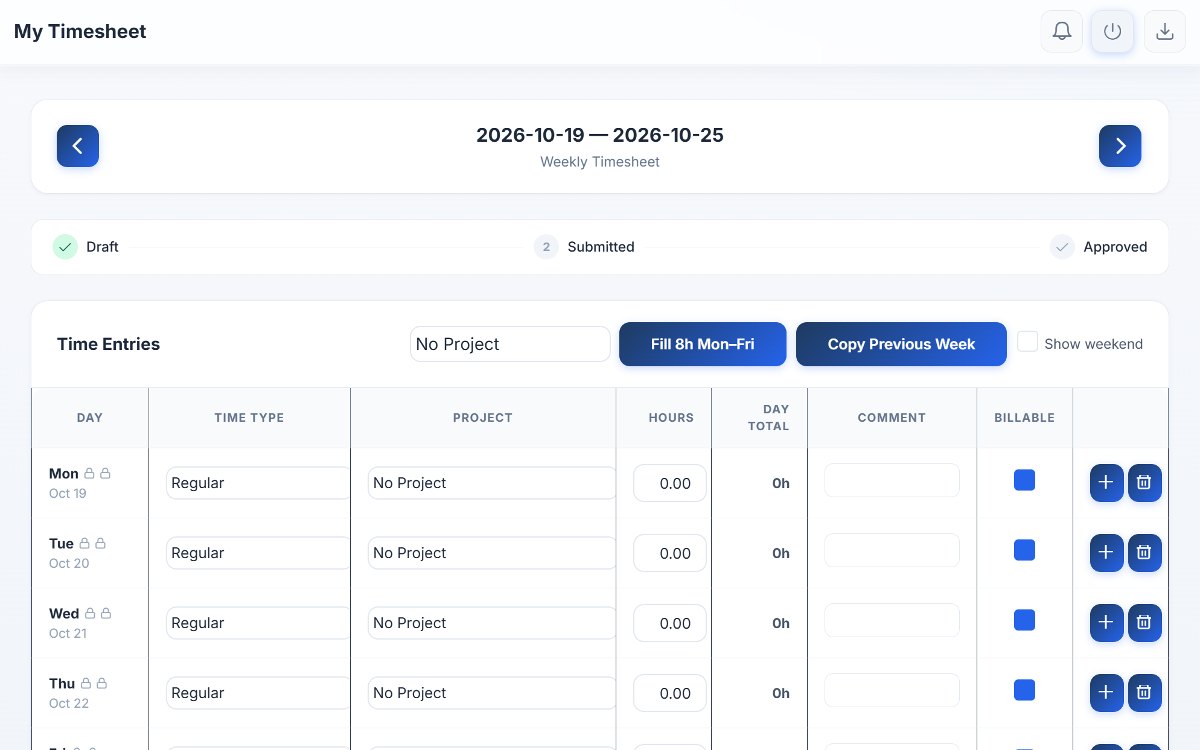
Weekly timesheets with regular and overtime totals, copy-previous-week, and file attachments. Missed punches are fixed through correction requests.

✅

Timesheet Approvals

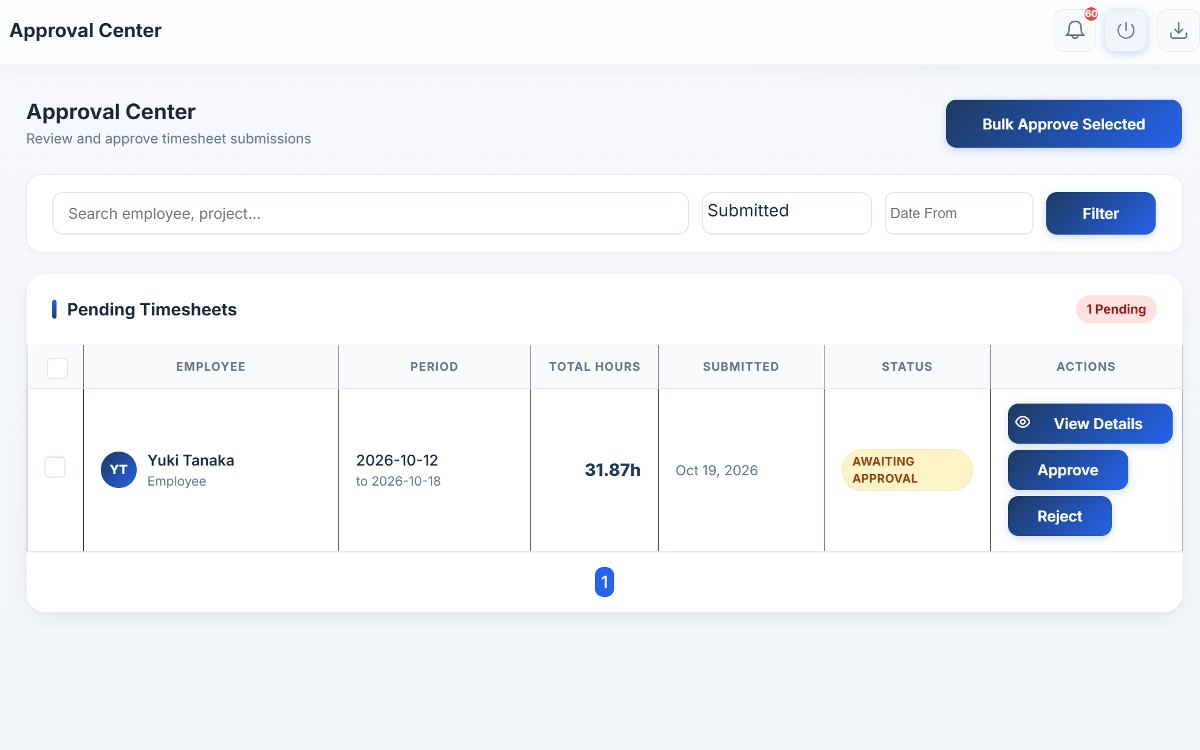
Submitted timesheets go to the right manager. Approve, reject, or bulk-approve from one Approval Center, with a full audit trail of every decision.

📊

Workforce Visibility

A live dashboard shows who's scheduled, clocked in, on break, late, or missing a punch, next to today's scheduled and actual labor cost.

See it in the app
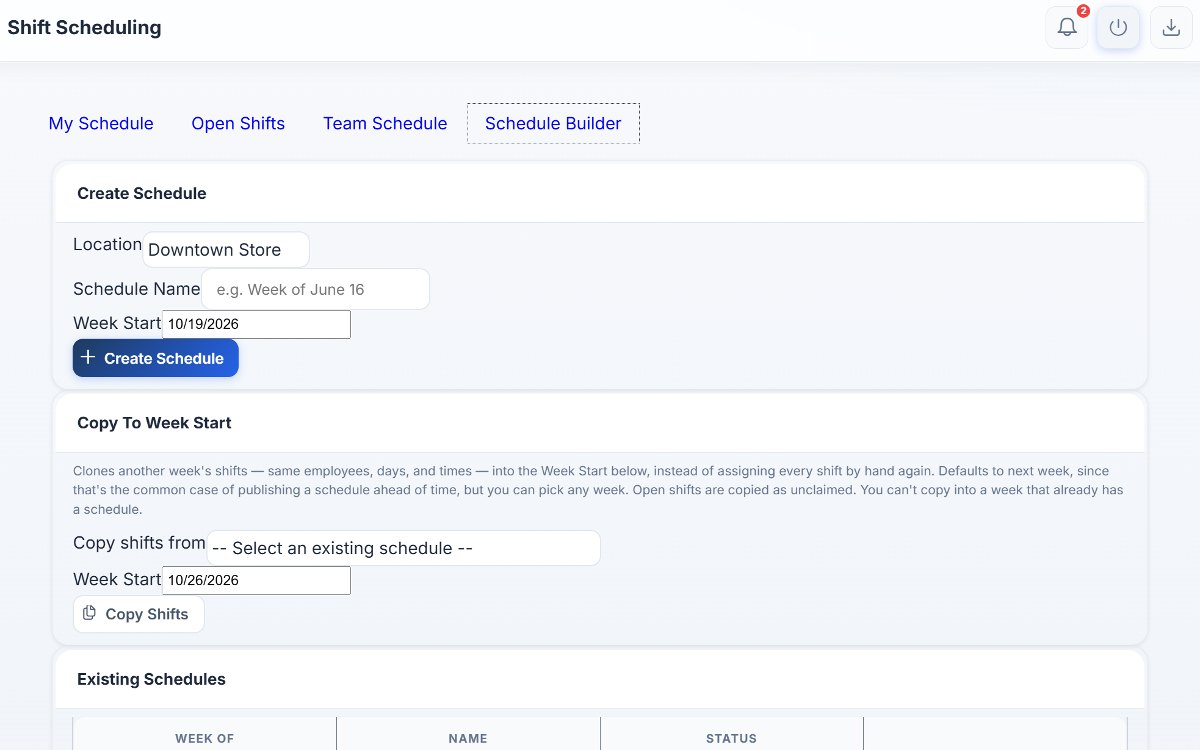
SchedAx Schedule Builder: create a weekly schedule for a store location and copy shifts from an earlier week
Schedule Builder
SchedAx weekly timesheet showing daily time entries and the Draft, Submitted and Approved steps
Weekly Timesheet
SchedAx Approval Center listing a pending timesheet with View Details, Approve and Reject actions
Approval Center

More of the platform

📱

QR & Kiosk Punch-In

Print a QR code, stick it on the job site gate. Workers scan with any phone — no app download, no account setup. Perfect for field crews and production floors with shared terminals.

⚡

Overtime Engine

Daily, weekly, double-time, and 7th-day OT rules — set to federal standard, state law, or your own thresholds, per department. Employee and manager are alerted as soon as overtime is logged.

💼

Labor Codes & Job Costing

Every timesheet entry tagged to a labor code, cost center, and project. Time-by-job reports for any period. Billing rate per code. Know your labor margin before the invoice goes out.

🗓️

Holiday & Leave Calendar

Configure paid holidays per calendar, region, or employee group. Leave requests flow through approval. Holiday hours auto-populate in timesheets. Works with multiple countries and pay rules.

📤

Payroll Export & Reports

One-click payroll file for every pay period — a CSV file, ready for your payroll provider. Hours split by department, cost center, and labor code, with overtime, PTO, tips, and expense reimbursements in their own columns. Reports export to Excel or PDF. Full pay period summary ready when payroll runs.

Pay Per Employee. Not Per Feature.

Every plan includes time tracking, approvals, and payroll export. Scale up as your team grows — no feature lock-outs at lower tiers.

Starter
$6
/ employee / month · billed annually
Minimum 3 employees · $18/mo
  • Time tracking (web + mobile)
  • Manager approval workflow
  • Punch correction requests
  • Basic overtime alerts
  • CSV payroll export
  • Holiday calendar
  • 3 admin users
  • 90-day audit trail
  • Email support (48 hr)
Request Free Access
Professional
$14
/ employee / month · billed annually
Minimum 10 employees · $140/mo
  • Everything in Growth
  • Full REST API
  • Advanced reporting + Excel export
  • Attendance engine
  • 3-year audit trail
  • Priority email support
Request Free Access
Enterprise
Custom
annual contract · volume pricing
 
  • Unlimited employees
  • Dedicated hosting options
  • Custom overtime rules
  • Dedicated Customer Success Manager
  • 7-year audit trail
  • Custom support terms in your contract
Talk to Sales

All plans: 14-day free trial · No credit card required · Save up to 20% with annual billing

Purpose-Built Beats Bolted-On. Every Time.

HRIS systems treat time tracking as a checkbox. Generic payroll tools can't handle QR punch or rotating shifts. SchedAx is built for exactly this — and it shows in every screen.

📱
Mobile-First PWA — No App Store
Works on any phone, no download required. Installs to the home screen like a native app. Timesheets save on the phone with no signal and sync when it returns. Field crews can actually use it.
🔒
True Schema-Per-Tenant Isolation
Your data never shares a database table with another company. Each tenant gets a fully isolated schema on your own subdomain. Enterprise-grade data separation without the enterprise price tag.
📐
Configurable Overtime Rules
Daily, weekly, double-time, and 7th-day rules — enough for California-style overtime. Set different thresholds per department. Not a one-size-fits-all toggle — actual rule logic.
📍
QR Punch Requires Zero Setup for Workers
Print one QR code. Stick it on the gate or wall. Workers scan, punch in, done. No account login, no app, no training. Managers see the event in real time. No hardware required.
🗂️
Immutable, Role-Scoped Audit Trail
Every punch, edit, correction, and approval logged with actor, timestamp, and before/after values. Managers see their team. Admins see everything. Nothing can be deleted — only corrected with a trail.
🏢
Multi-Location, One Platform
Manage 50 job sites or 200 store locations from one admin portal. Each work location gets its own QR code and GPS check, with schedules, rules, and reports by department across the whole operation.

Start Your 14-Day Free Access

Explore how SchedAx can simplify employee scheduling, time tracking, and timesheet management for your business.

  • ✓ Free 14-day trial — full access, no feature restrictions. See everything working before you decide.
  • ✓ Dedicated onboarding session — 45-minute live setup call with your SchedAx account manager included with every request.
  • ✓ Your subdomain, instantly — you get yourcompany.schedax.com the moment your account is provisioned.
  • ✓ We import your employees — send us your spreadsheet and we'll handle the bulk import at no charge.
  • ✓ No credit card to start — billing begins only when you decide to continue after the trial.
🔒 Encrypted connections (HTTPS)
🌐 US-hosted · daily backups
🛡️ Separate database per company
Request Free Access
We typically respond within one business day.
Prefer to talk? Call 888-700-7786.

No credit card required. By submitting you agree to our Privacy Policy.